
How the meeting Notetaker works
What the Fyxer Notetaker does during meetings, how summaries are generated, and where to find your notes afterward.
The Fyxer Notetaker joins your online meetings, captures the discussion, and generates clear, structured notes for you and your team. This article explains what Notetaker does during a meeting and what you can expect afterward.
What Notetaker does
During the meeting
Joins as a meeting participant
Records and transcribes the conversation in real time
Identifies discussion topics, decisions, and action items
Captures speaker changes and key moments
Supports multiple Fyxer users in the same meeting (their Notetakers merge into one participant)
After the meeting
Notetaker automatically:
Processes the audio into a searchable transcript
Generates a structured meeting summary
Extracts action items, decisions, and follow-up points
Creates context for suggested follow-up drafts
Stores recordings, transcripts, and summaries in your Dashboard
Sends you an email with your meeting summary, labeled as an FYI in your inbox
The goal is to remove manual note-taking so you can stay engaged in the conversation while still getting a clear record afterward.
How multiple Notetakers are handled
If more than one person from the same organization attends the same meeting, each person's Notetaker (whether the online Notetaker bot or the desktop version) creates its own recording. Each user receives:
Their own copy of the summary
Their own transcript
Their own recording
Personal suggested follow-ups
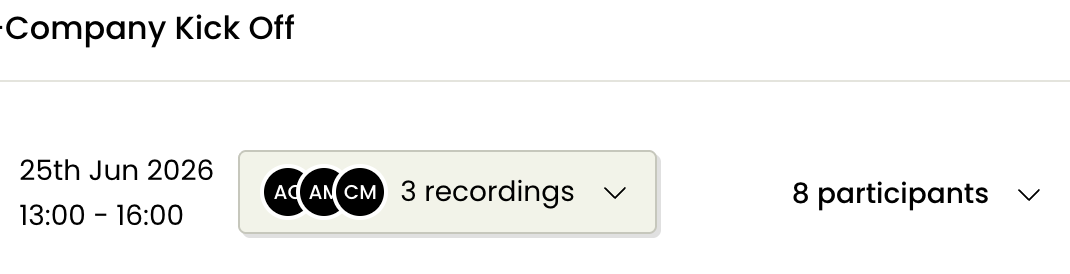
To switch between recordings from different attendees, use the recording selector button at the top of the meeting page.
The recording selector shows each attendee's initials and how many recordings exist for that meeting. Select an attendee's name from the dropdown to view their version of the summary, transcript, and recording.
Where to find your meeting
After the meeting ends, you'll be sent your summary labeled as "FYI" and all outputs are stored in: Dashboard → Notetaker → Recorded.
From there, you can:
Replay the meeting
Review or download the transcript
Edit, regenerate or translate the meeting summary
Create snippets of key moments
Copy or export notes
Everything from the meeting lives in one place for easy reference and sharing, and you always have the emailed FYI summary in your inbox.
If a recent meeting's summary is stuck on "processing" or shows an error, Fyxer automatically retries it, so it often recovers after a short wait. If this is the case, wait a bit and then refresh your browser.
Still have questions?
Head to the chat in the bottom right of your Dashboard.